A pace that fits the window.
Scrolling follows words rather than a fixed pixel speed. Resize the window or change the text size while keeping your selected reading pace.

 Kyu
Browser teleprompter
Kyu is a small browser teleprompter for video calls and recordings. Put its window near your webcam and let your script scroll at the pace you choose.
Free to use. No account needed. Scripts save in this browser.
How it works
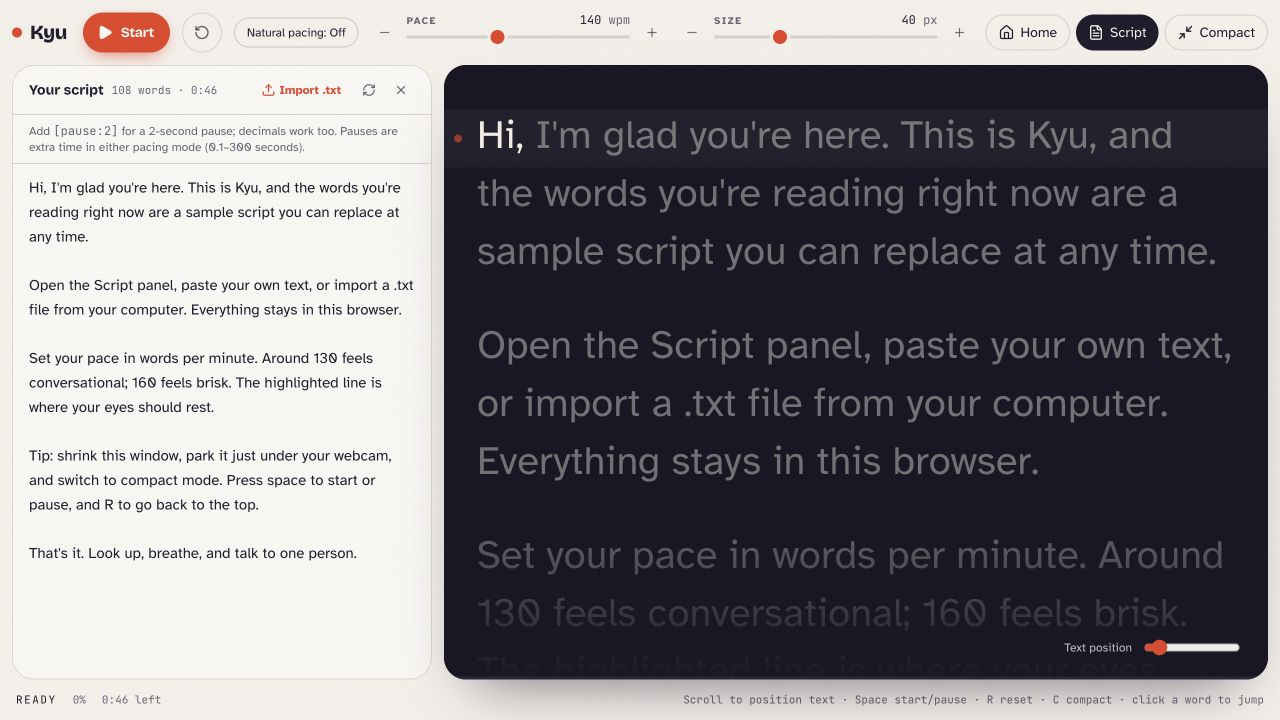
Type, paste, or import a plain .txt file. Your script appears in the reading view, ready to rehearse.
Choose your words per minute, text size, and reading position. Add a pause where you want a moment to breathe.
Place the window near your webcam, switch to compact mode, and start. Pause, reset, or click a word to pick up where you need to.
A comfortable reading view
Scrolling follows words rather than a fixed pixel speed. Resize the window or change the text size while keeping your selected reading pace.
Optional natural pacing estimates English syllables and adds breathing room around punctuation and paragraphs. Add explicit pauses with cues such as [pause:2].
The current word is highlighted and earlier words dim as you read. Adjust the vertical reading position and hide the controls with compact mode.
Start and pause with Space, reset with R, or toggle compact mode with C when you are outside the script editor. Click a word to jump to it.
Scripts and storage
Kyu processes your script on your device and saves one current script and your reading settings in this browser. There is no account or cloud sync. Keep a separate copy of any script you want to save.
The app also uses Replit hosting, pageview analytics, and Google Fonts. The privacy page explains these services separately from your locally saved script.
Read how Kyu handles dataWe built Kyu to make a familiar task a little easier: following a script while speaking to a camera. Our consulting work brings that same practical approach to the systems, data, and workflows behind growing businesses.
Kyu by Hedgehog Technology Consulting.